Introduction
Your phone rings at 2 PM. A potential client needs help with anxiety and wants to schedule an initial consultation. But you're in session with another client. The call goes to voicemail. They leave a message. You plan to call back between sessions. But your next client arrives early, then you're running late, and by the time you think about that callback at 6 PM, they've already booked with another therapist.
You just lost $1,500 in potential revenue. Ten sessions with a new long-term client, gone.
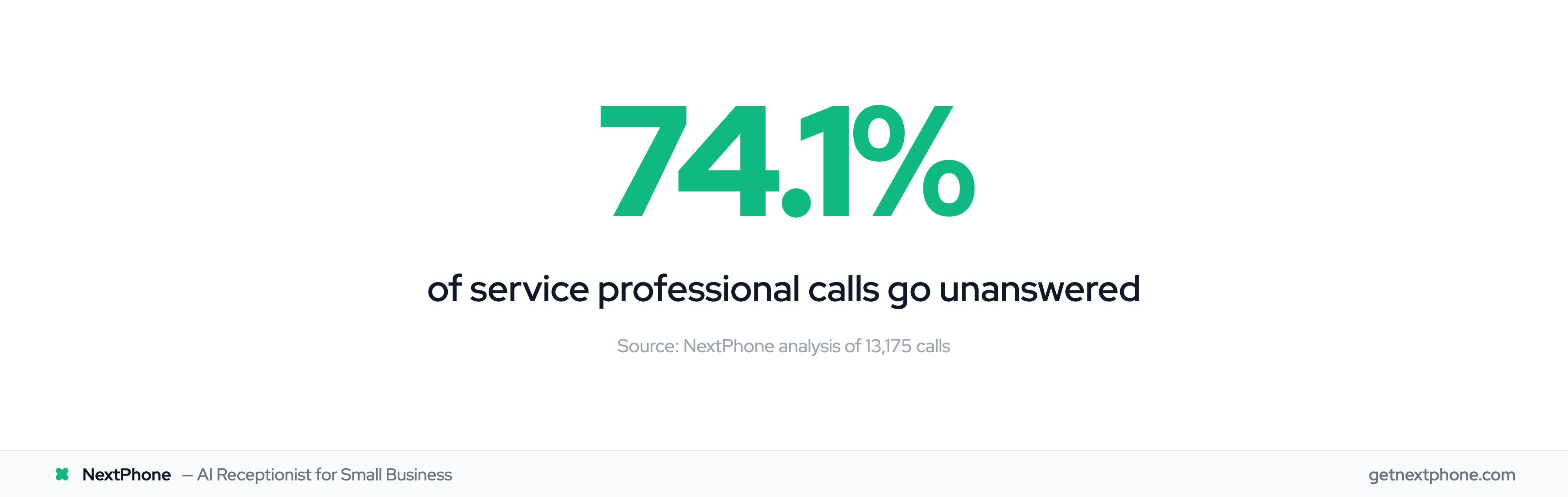
This happens more than you think. In our analysis of 130,175 calls from 45 service-based businesses over 7 months, 74.1% of calls went completely unanswered. For therapists, coaches, and consultants who rely on phone inquiries for new client acquisition, that's a revenue crisis hiding in plain sight.
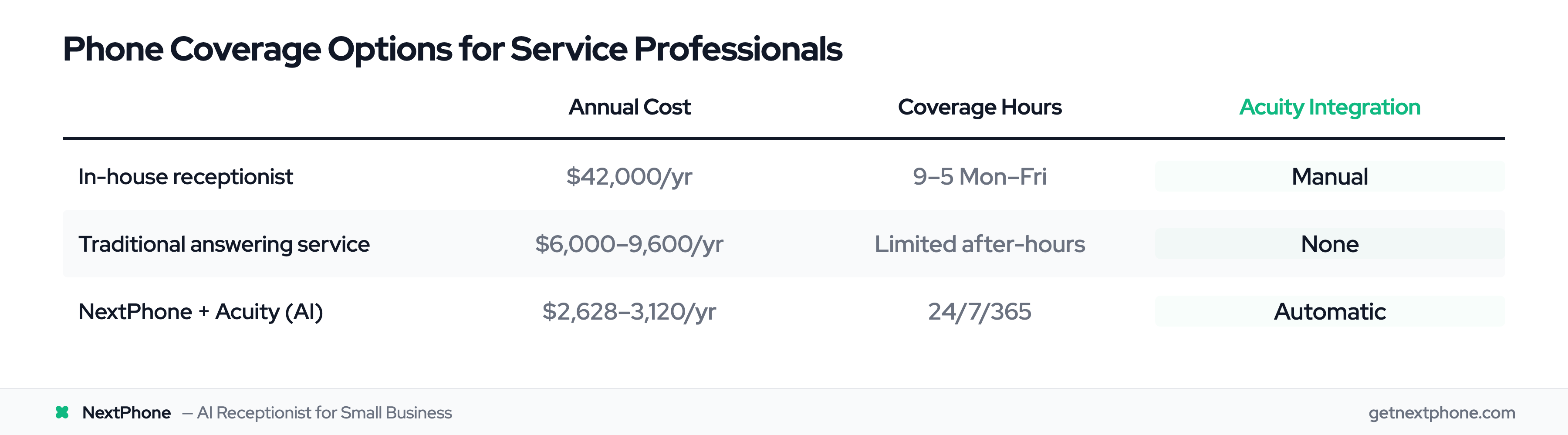
Here's what you'll learn: how Acuity Scheduling's powerful features can combine with AI phone integration to capture every client call, collect intake information during conversations, and automatically book appointments - all without hiring a receptionist.
The Hidden Cost of Missed Calls for Service Professionals
The Reality: Most Calls Go Unanswered
If you're a therapist, coach, or consultant, you work one-on-one with clients. When you're in session, you can't answer the phone. Between sessions, you're writing notes, prepping for the next client, or finally taking a bathroom break. Evenings and weekends - when many potential clients actually have time to call - you're off the clock.
The result? Practices receiving 100 new patient calls monthly are potentially losing over $200,000 annually-dsos) in appointments that never happened.
Our data confirms this. We analyzed 130,175 calls from service professionals over seven months. Three out of every four calls went completely unanswered. That's not a phone system problem. That's a fundamental mismatch between how clients want to connect (phone calls) and when service professionals are available (never).
Why Service Professionals Can't Answer
You're not avoiding the phone because you're lazy. You're unavailable because you're doing your actual job.
Therapists spend 15-20 hours weekly on administrative tasks like insurance verification, claim submissions, and payment tracking. Add client sessions, and there's zero time left for phone duty.
The shift to self-scheduling is accelerating: patient self-scheduling surged 30% year-over-year, and 61% of medical practices now allow online patient self-scheduling.
Coaches and consultants face the same squeeze. You're either actively working with clients or handling the mountain of admin work required to keep your practice running. The phone rings during both.
The Revenue Impact
Let's do the math for a typical therapy practice:
- 42 calls per month (about 10 per week)
- 74.1% go unanswered = 31 missed calls monthly
- 30% of callers would have booked (conservative estimate) = 9 lost clients
- Average session rate: $150
- Average client stays for 10 sessions = $1,500 lifetime value
- Monthly loss: $13,500
- Annual loss: $162,000
Even if you're smaller or have lower rates, the numbers hurt. A coach charging $200 per session with 25 calls per month is losing $22,200 per year.
Then there's the callback problem. We found that 25.4% of calls included explicit callback requests. Without a systematic tracking system, most callback requests fall through the cracks. You write "call back Sarah" on a sticky note. The sticky note ends up under your coffee cup. Sarah books with someone else.
What Acuity Scheduling Does Well (And the One Thing It Doesn't)
Acuity's Core Strengths
If you're using Acuity Scheduling, you already know it's excellent at what it does. The online scheduling interface is clean. Clients can self-book appointments without playing phone tag. Your calendar syncs with Google or Outlook, so double-bookings don't happen.
The intake forms feature lets you collect important information before sessions. What brings you to therapy? Have you been in therapy before? Any current medications? Clients fill these out when they book online, so you're not spending the first 15 minutes of your initial session gathering basic facts.
Packages work beautifully for multi-session commitments. A client can buy a 6-session coaching package, and Acuity handles the scheduling logistics.
Payment processing integrates with Stripe, Square, and PayPal. Video conferencing connects to Zoom and Google Meet. Acuity has about 40 integrations with emphasis on tools service professionals actually use - Quickbooks for accounting, email marketing platforms, and CRM systems.
For online self-service booking, Acuity is hard to beat.
The Missing Piece: Phone Answering
Here's what Acuity doesn't do: answer your phone.
When a potential client calls your practice, Acuity can't help. It has no phone interface. No call answering capability. No way to guide a caller through booking an appointment verbally.
You have two options:
- Answer the phone yourself (impossible when you're with clients)
- Let it go to voicemail (and watch 74.1% of callers never convert)
This isn't a criticism of Acuity. It's a scheduling platform, not a phone system. But for service professionals who receive most new client inquiries by phone, it creates a gap.
Your online scheduling is perfect. Your phone coverage is nonexistent.
How AI Phone Systems Integrate with Acuity Scheduling
Understanding Acuity's API and Webhooks
Acuity provides a robust API for external integrations. This is how third-party systems can talk to your Acuity account - reading your availability, creating appointments, updating client information.
Webhooks work in the opposite direction. When something happens in Acuity (appointment scheduled, canceled, or rescheduled), Acuity can notify an external system by sending data to a specified URL.
This bi-directional communication - API calls going TO Acuity, webhooks coming FROM Acuity - makes integration possible.
There are limits. Acuity allows up to 25 webhooks per account. Failed webhook calls are retried with exponential backoff over 24 hours. But the foundation is solid for connecting external systems.
AI Phone Systems: The Missing Phone Layer
AI phone answering systems answer calls 24/7 in under 5 seconds. They use natural language processing to understand what callers are asking for. They can have actual conversations, not just robotic menu trees.
Modern AI can collect structured information during these conversations. Name, phone number, email, what service they're interested in, preferred appointment times, intake questions - anything you'd normally ask during a phone call.
The AI can then trigger actions during the call. It can check availability by calling an API. It can send data to external systems via webhooks. It can send follow-up text messages or emails.
Research shows that AI systems can reduce no-shows by up to 70% with automated reminders and confirmations. Other studies found that AI reduces operational costs by 60% and improves booking accuracy by 50%.
The key is that AI can handle the phone conversation Acuity can't.
How the Integration Works (Technical Overview)
The integration workflow:
- AI phone system (like NextPhone) receives incoming call to your practice number
- AI answers and has a natural conversation with the caller
- During the call, AI collects booking information (name, email, preferred date/time, service type, intake questions)
- AI checks Acuity's availability via API call
- AI sends HTTP POST request to Acuity API with appointment details
- Acuity creates the appointment and sends confirmation email to client
- AI can send follow-up SMS with booking details
- Practice owner receives email notification with call summary
All of this happens while the caller is still on the phone. They hang up with a confirmed appointment. You arrive at work the next morning to an email: "New client Sarah Rodriguez booked for Tuesday 3 PM - Anxiety counseling, first-time client."
The Complete Call-to-Booking Workflow
Let's walk through exactly what happens when a potential client calls your practice.
Step 1: Client Calls Your Practice
Sarah calls your therapy practice at 8 PM on a Tuesday. She's been struggling with anxiety and finally worked up the courage to reach out for help.
With a traditional setup, she gets voicemail. Maybe you call back tomorrow. Maybe you don't. Maybe she's already too anxious to try again.
With AI integration, the call is answered in under 5 seconds.
Step 2: AI Answers and Qualifies
AI: "Thank you for calling Mindful Therapy. I'm here to help. What brings you in today?"
Sarah: "Hi, I'm looking for help with anxiety. Do you have any openings?"
AI: "I can definitely help you find an appointment. Are you a new client or have you seen us before?"
Sarah: "I'm new."
The AI understands the intent - new client inquiry for anxiety counseling. It's not reading from a rigid script. It's having a natural conversation.
Step 3: Information Collection
AI: "I'd like to get some information to set up your appointment. What's your full name?"
Sarah: "Sarah Rodriguez."
AI: "And what's the best phone number to reach you?"
Sarah: "555-0123."
AI: "Email address?"
Sarah: "sarah.rodriguez@email.com"
AI: "You mentioned anxiety. Can you tell me a bit more about what you're experiencing?"
Sarah describes her symptoms. The AI is collecting intake form information during the conversation, not making her fill out a form later.
Step 4: Appointment Booking in Acuity
AI: "I'm checking our availability now. We have openings on Thursday at 4 PM or Friday at 2 PM. Which works better for you?"
Sarah: "Thursday at 4 works."
AI: "Perfect. I'm booking you with Dr. Chen for Thursday, March 14th at 4 PM for an initial anxiety consultation. You'll receive a confirmation email at sarah.rodriguez@email.com in just a moment."
Behind the scenes, the AI has:
- Checked Acuity's calendar via API
- Found available slots matching the appointment type (initial consultation)
- Created the appointment in Acuity with all Sarah's information
- Triggered Acuity's confirmation email
Step 5: Confirmations and Follow-ups
Sarah receives an email from Acuity with:
- Appointment details
- Calendar invite
- Link to intake forms (if you have additional forms beyond what AI collected)
- Cancellation/rescheduling policy
You receive an email notification:
- New Appointment Booked
- Client: Sarah Rodriguez
- Date: Thursday, March 14, 4 PM
- Service: Initial Anxiety Consultation
- Notes: First-time client, experiencing anxiety symptoms (collected during call)
- Call recording and transcript attached
Sarah hangs up with a confirmed appointment. You have a new client. The entire process took 3 minutes. Nobody lifted a finger.
Intake Forms: Online Booking vs Phone Call Collection
How Acuity Intake Forms Work
Acuity's intake forms feature lets you create custom forms for each appointment type. When clients book online, they fill these out as part of the scheduling process.
For a therapy practice, you might ask:
- What brings you to therapy today?
- Have you been in therapy before?
- Are you currently taking any medications?
- Who referred you to our practice?
- What are your goals for therapy?
For healthcare providers, you can add SOAP notes (Subjective, Objective, Assessment, and Plan), which are marked for internal use only.
This works beautifully for online booking. Clients show up to their first session with intake already complete. You're not spending the first 15 minutes gathering basic information.
The Limitation: Phone Callers Can't Fill Forms
Here's the problem: intake forms only work for online self-scheduling.
When someone calls, they can't access your Acuity intake form. You have three bad options:
- Skip intake entirely (client arrives unprepared, you gather info during session)
- Email the form after the call (extra step you'll probably forget, client may not fill it out)
- Ask questions verbally during the call while frantically typing into Acuity (assuming you even answered the call)
There's also a technical limitation in Acuity itself: clients can't complete intake forms when buying packages, gift certificates, or subscriptions. If you offer a 6-session therapy package or a 3-month coaching commitment, the intake form step is skipped.
AI Solution: Collecting Intake Data During Calls
AI phone systems solve this by asking intake questions conversationally during the booking call.
Instead of: "Please go to our website and fill out the intake form before your appointment."
The AI asks: "I'd like to learn a bit more about what brings you in. Can you tell me about the symptoms you're experiencing?"
The caller responds naturally. The AI structures their responses into data fields, exactly like an intake form would. When the AI pushes the appointment to Acuity via webhook, it includes all this intake information in the notes field or custom fields.
The therapist sees:
New Client: Sarah Rodriguez Intake Information:
- Reason for visit: Anxiety management
- Previous therapy: No
- Current medications: None
- Referral source: Friend recommendation
- Primary concerns: Work stress, difficulty sleeping, racing thoughts
- Goals: Learn coping strategies, reduce anxiety symptoms
All collected during a 3-minute phone call. No form to email. No follow-up needed. Client arrives with intake complete.
Crisis Call Handling for Therapy Practices
The Challenge: Mental Health Crisis Calls
If you're a therapist or counselor, you face a unique challenge that coaches and consultants don't: crisis calls.
Someone calls your practice in acute distress. They're having a panic attack. They're experiencing suicidal ideation. They need help right now, not an appointment next Tuesday.
These calls require immediate human intervention. They have legal and ethical obligations. You can't have them go to voicemail. You can't have an AI try to "handle" them with pre-programmed responses.
Can AI phone systems safely manage this reality?
AI Detection of Urgency Keywords
Modern AI is trained to recognize urgency language and distress signals in real-time.
In our analysis of 130,175 calls, 15.9% contained urgency keywords like "emergency," "urgent," "ASAP," "crisis," "can't cope," or "suicide." Another 6.2% were true emergencies requiring immediate response.
AI systems can detect these patterns:
- Specific words: "suicide," "kill myself," "can't go on," "emergency"
- Tone indicators: Rapid speech, crying, panic
- Context clues: "I need help right now," "I don't know what to do"
When the AI identifies crisis language, it doesn't try to schedule an appointment. It immediately shifts to crisis protocol.
Immediate Human Transfer Protocol
The moment AI detects a crisis, it transfers the call to a human.
Caller: "I'm having really dark thoughts and I'm scared."
AI: "I'm going to connect you with someone who can help you right away. Please hold on."
The call transfers to:
- Your cell phone (if during business hours and you've configured immediate transfer)
- Your crisis backup line (answering service or on-call clinician)
- National crisis hotline (988 Suicide & Crisis Lifeline) if after-hours and no backup available
The transfer happens within seconds. The caller goes from AI to human without hanging up and redialing.
All crisis calls are flagged in your system for follow-up review. You get an immediate notification: "Crisis call transferred to your cell phone at 8:47 PM - caller reported suicidal ideation."
This is smart forwarding in action: AI handles administrative calls (scheduling, questions, intake), clinical and crisis calls forward directly to your team. AI resolves the volume; you handle what matters.